
BetAA Game Withdrawal Guide 2026: How to Cash Out Your Winnings Step by Step

BetAA Game is an online gaming platform where players can enjoy games and earn real money at the same time. Many users like the app not only for entertainment but also as a way to make some extra income. Rewards from completed tasks and won games are added to the user’s in-app wallet. New players, however, often find it confusing to figure out how to withdraw those earnings to their bank account or mobile wallet.
Knowing how to withdraw money from BetAA Game is essential if you want to actually enjoy what you’ve earned. In just a few easy steps, you can send your winnings to Easypaisa, JazzCash, or your bank account.
Step-by-Step Guide to Withdraw Money From BetAA Game
Step 1: Open the App and Tap Withdraw
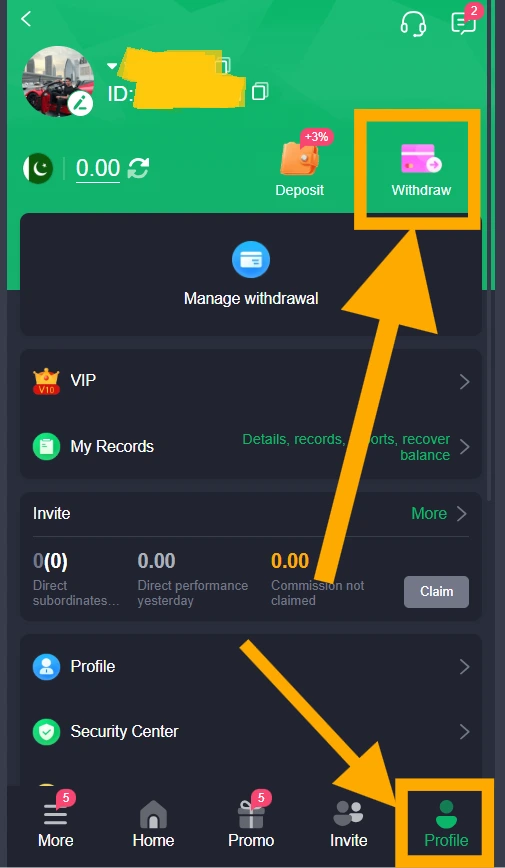
Launch the BetAA Game app and make sure you’re signed in to the correct account. Tap the Profile tab at the bottom right of the screen. Your balance appears at the top of the page, next to the Deposit and Withdraw buttons. Tap Withdraw to begin. Show Image
Step 2: Set Up Your Withdrawal Password
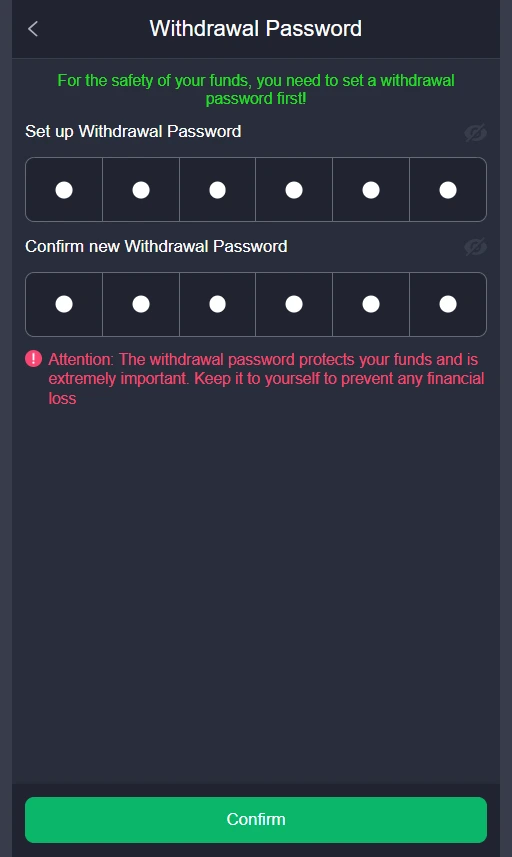
If this is your first withdrawal, the app asks you to create a 6-digit withdrawal password to protect your funds. Enter it once, type it again in the confirmation box, and tap Confirm. Keep this password private, because you’ll need it every time you withdraw. Show Image
Step 3: Add Your Withdrawal Account
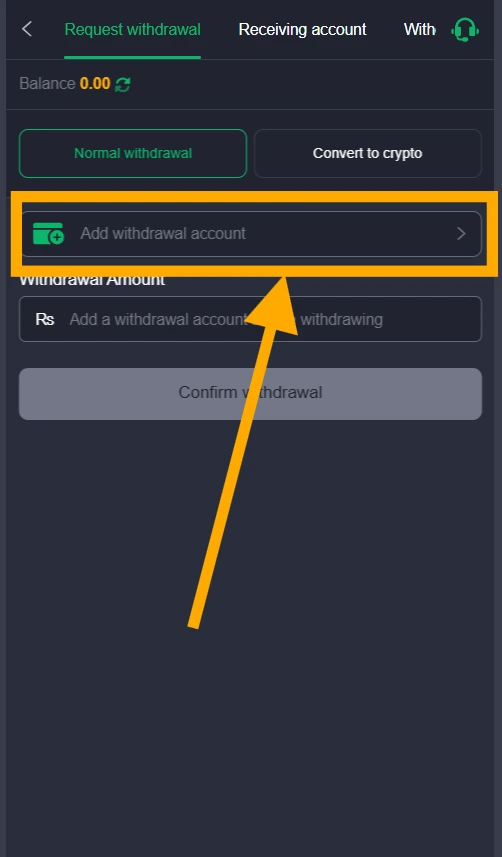
On the Request withdrawal tab, tap Add withdrawal account to link the account where you want to receive your money. You only need to do this once, and you can reuse the account for later withdrawals. Show Image
Step 4: Choose Your Payment Method
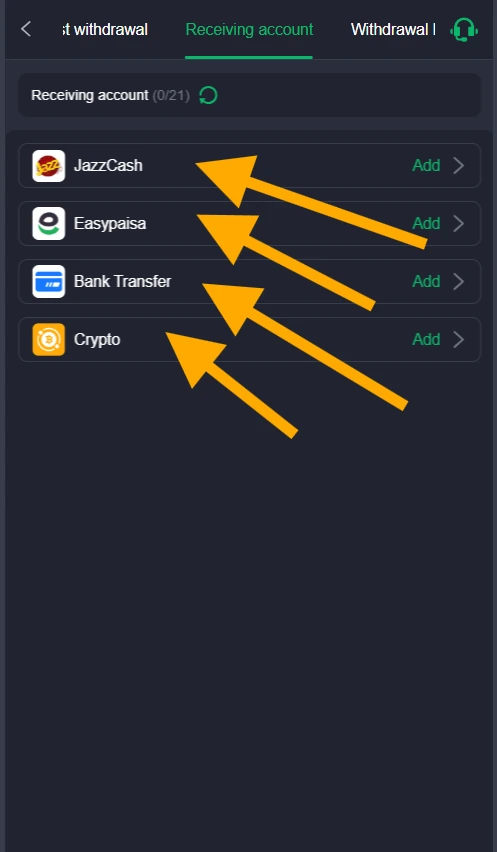
The Receiving account tab lists the available options: JazzCash, Easypaisa, Bank Transfer, and Crypto. Tap Add next to the method you want. Choose an account that is active and registered in your own name. Show Image
Step 5: Enter Your Account Details
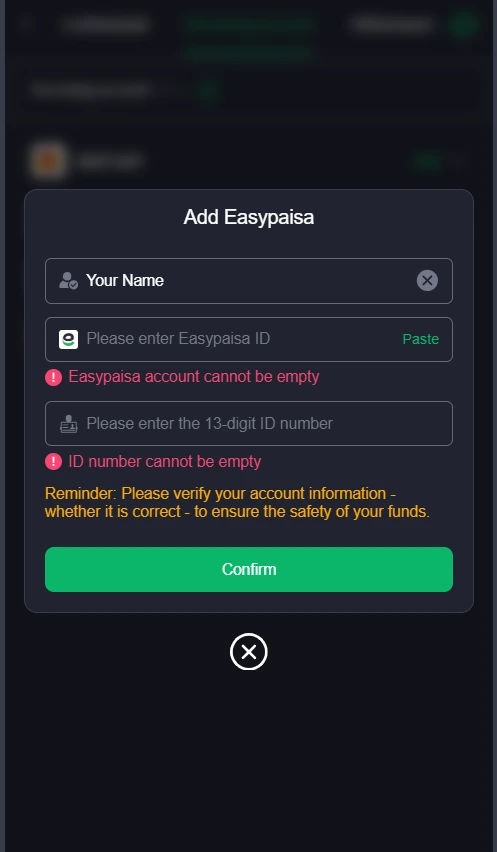
Fill in the form for your chosen method. For Easypaisa, enter your name, your Easypaisa ID (account number), and your 13-digit ID number. Check every detail carefully, since a wrong digit can delay or block your payment. Then tap Confirm. Show Image
Step 6: Enter the Withdrawal Amount
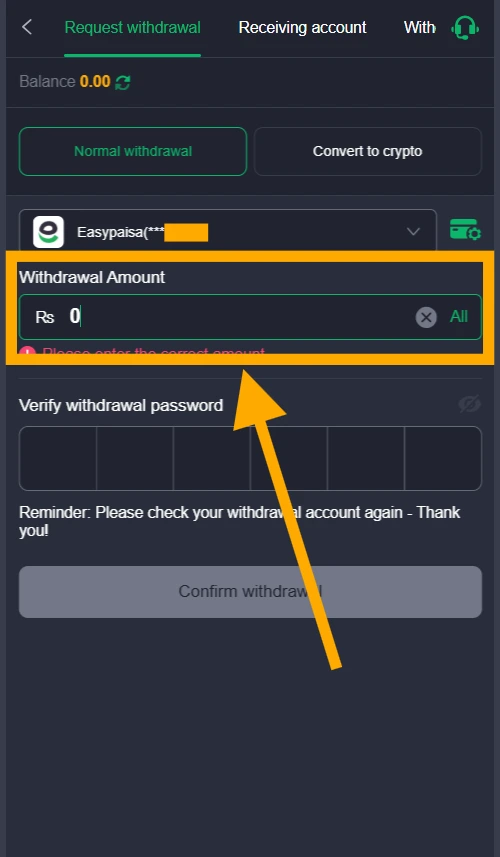
Return to the Request withdrawal tab and keep Normal withdrawal selected. Choose your saved account, then type the amount in the Withdrawal Amount field. To cash out your full balance, tap All. Show Image
Step 7: Verify Your Withdrawal Password
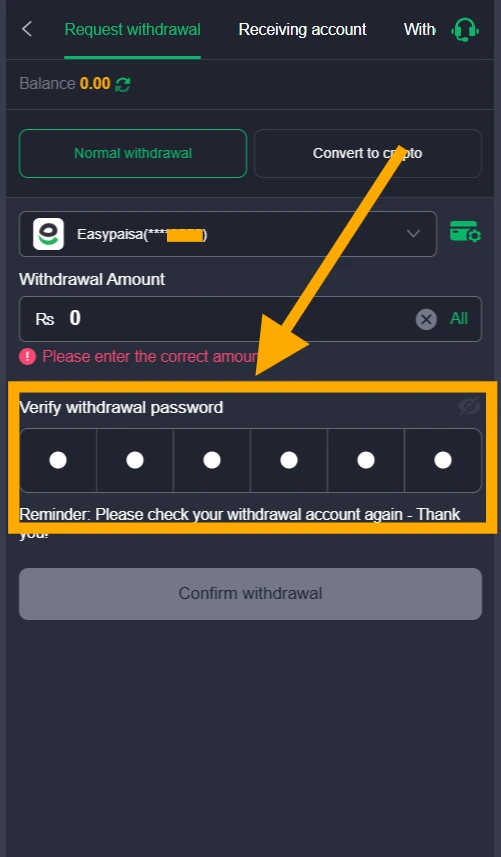
Enter the 6-digit withdrawal password you created earlier in the Verify withdrawal password boxes. The app also reminds you to check your withdrawal account again, so take a moment to confirm it’s correct. Show Image
Step 8: Confirm Your Withdrawal
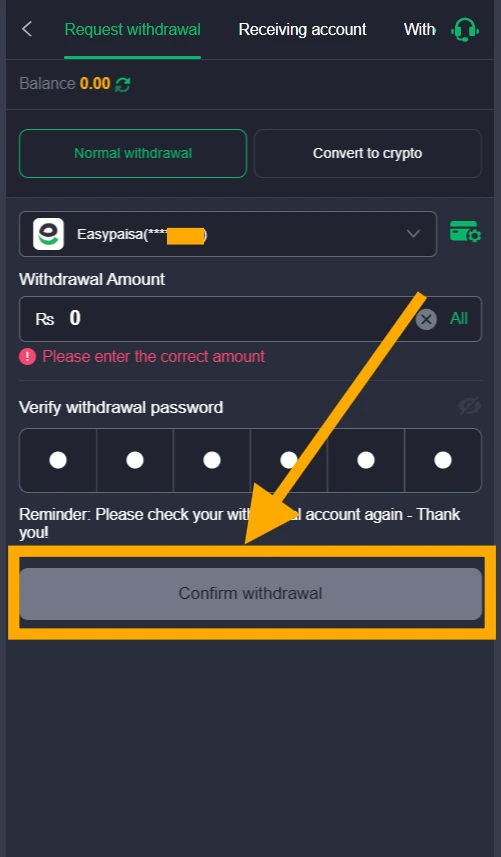
Once the amount and password are filled in, the Confirm withdrawal button becomes active. Tap it to submit your request. BetAA Game will then start processing it. Show Image
Step 9: Wait for the Payment
After submission, your request goes into processing, which can take anywhere from a few minutes to 24 hours depending on the method you chose. Watch your Easypaisa, JazzCash, or bank account for the incoming funds. If the payment is delayed for too long, contact BetAA Game’s support team through the headset icon in the app.
Tips for Easy Withdrawal
Follow these 5 simple tips for smooth withdrawals from BetAA Game.
1. Double-Check Your Account Details
Before requesting a withdrawal, verify your account information. Confirm that your Easypaisa, JazzCash, or bank details are correct, including the phone number, account number, and bank name. Even a small typo can delay or cancel your payment. Accurate details get your money to you faster and save you unnecessary trouble.
2. Use a Verified Payment Method
Choose a payment method that is active and verified, and never use someone else’s account. Make sure your mobile wallet or bank account works properly and has no receiving limits. Verified accounts are safer and more reliable, and they make transfers faster.
3. Maintain the Minimum Balance
Check that your BetAA Game wallet meets the minimum withdrawal amount before you submit a request. If your balance is too low, keep playing until you reach the limit. Requests below the minimum can’t be processed.
4. Withdraw During Working Hours
Request your withdrawal during the daytime, when banks and payment services are open, for faster processing. Late-night requests may take longer, and weekdays are usually quicker than Sundays or public holidays.
5. Keep Your App Updated
Always use the latest version of the BetAA Game app. Older versions can cause errors during withdrawals, while updates fix bugs, add features, and make the app run more smoothly.
Common Problems and Solutions
Problems
- Money hasn’t arrived after a withdrawal
- Incorrect account details were entered
- The withdrawal option isn’t visible
- The minimum withdrawal amount hasn’t been reached
- The BetAA Game app stops working during withdrawal
Solutions
- Wait up to 24 hours, then check your payment account again.
- Always verify your account details carefully before submitting.
- Log out and log back in, or update the BetAA Game app to the latest version.
- Check the BetAA Game app to see the minimum withdrawal limit.
- Close the BetAA Game completely and restart your phone.
Conclusion
Withdrawing your winnings from BetAA Game is easy when you follow the right steps. Enter accurate account details, choose a reliable payment method, and make sure your balance covers the amount you want to cash out, and most common problems can be avoided. The process is built to be fast and simple, so even first-time users can handle it without trouble. If something does go wrong, the support team is ready to help.
It’s also wise to keep your app up to date and use secure payment options to protect your earnings. Before you submit a withdrawal request, double-check your wallet balance and the details you’ve entered. With these tips and a bit of patience, cashing out from BetAA Game is smooth and hassle-free. So play your favorite games and withdraw your earnings with confidence.